




Tradesyncer
Trade copiers
Cloud futures copier with journal and risk controls
Cloud · 6 platforms
from $49 /mo
7-day free trial (card required)Most visited
Exclusive codes Negotiated by us with each firm.Save money
Choose
Read
Most visited
Exclusive codes Negotiated by us with each firmEverything
 FundedTraderMarkets Launches FTM MCP to Integrate Accounts with ChatGPT and Claude
 Fundex Announces Price Reductions for 1-Step Classic Evaluations
 PipFarm Launches $1K Instant Account for $5
 Atlas Funded introduces VIP Ranks: a 26-tier progression system with rewards
 FXIFY Launches Rewards Program in FXIFY Hub
 DNA Funded Goes Dark: No Support, No Social Media and an Abandoned Discord
 The Trading Pit lowers its Instant account pricesFundex Launches 1-Step Classic: Single-Phase Evaluation with 10% Target and On-Demand Payouts
 Finotive Pay Launches Virtual IBANs and Updates Payment Infrastructure
 FundedElite Launches Elite Packs: A Card-Based Reward System for Traders
 TopOneTrader debuts Launch Pad with the release of X-DAILY accountsFinotive Announces Mobile-First Redesign for Finotive One PlatformFundedTraderMarkets Launches FTMate AI Assistant for Account Management
 TheGodFunded launches its new website
 GoatFundedTrader Updates Copy Trading Rules and Reduces Minimum Trade Duration
Tradecopia
Futures copier on your computer or in the cloud
On this page
Your platform's own copier
Some futures firms include a copier. Check before paying for one.
Before paying, check on your firm's page whether it allows copy trading. Some forbid it and you could lose the account.
Pro
$49.99 /mo
$34.99 a month paying upfront
You save $180 a year
Desktop app for Windows and Mac (runs through Rosetta on Apple Silicon Macs). Your computer has to stay on
Pro+ Lite
$79.99 /mo
$59.99 a month paying upfront
You save $240 a year
Cloud, in the browser; shared server. Includes Hard Lock and TradingView alerts
Pro+
$149.99 /mo
$119.99 a month paying upfront
You save $360 a year
Dedicated server with static IP; no trial
Tradecopia is a futures-only trade copier. You trade on one account, the leader, and Tradecopia replicates every order on your other accounts, the followers, even when they sit at different prop firms. What sets it apart is that you choose where it runs: as a program on your own computer, or on one of its servers through the browser. And every plan copies to unlimited accounts for a flat price.
We read its entire help center (96 articles), its terms of service, 217 Trustpilot reviews, around forty Reddit threads and the copy trading rules of eleven futures prop firms. This is what we found.
Tradecopia Solutions Inc. is a Canadian company based in North Vancouver, British Columbia. It is young: its first public reviews date from September 2025. On Reddit it is currently the copier most often recommended to people leaving Tradesyncer.
Three things in its terms worth knowing before you pay:
It is not a broker and does not provide signals: it is software only.
Tradecopia runs in two ways, and almost everything else depends on which one you choose.
Pro, desktop. You install a program on Windows or Mac, and follower orders leave from your computer and your connection. Many users pick it for exactly that reason: no shared server, and orders come from their own IP. But the trade-offs are clear:
Pro+ Lite and Pro+, in the cloud. Tradecopia runs on a server and you control it from the browser, including on your phone. You can switch your computer off. You choose the server location: Chicago by default, or New York, Dallas, London, Frankfurt, Singapore or Tokyo, with the providers ChartVPS or QuantVPS. Updates are deployed outside market hours.
The difference between the two cloud plans is capacity. On Pro+ Lite the server is shared with other users, although each has an isolated environment. On Pro+ the capacity is yours alone, built for many accounts or heavy scalping. The features are the same.
Never run both versions on the same accounts at once: every order would be copied twice.
Tradecopia does not connect to your charting platform, but to the provider behind your account. You can trade from TradingView, Quantower or Sierra Chart, as long as the account is with one of these:
| Connection | What you should know |
|---|---|
| Tradovate | Connects with your login, through OAuth. The most common option at prop firms |
| NinjaTrader | These are Tradovate accounts seen through NinjaTrader. They connect the same way |
| Rithmic | Rithmic-issued accounts only. You need your firm's exact system name |
| TopStepX | Topstep only. The TopStepX API is paid separately: $29 a month, or $14.50 with Topstep's code |
And what it does not support:
There is no limit on accounts or connections on any plan. You also cannot connect someone else's prop firm accounts: the subscription is for a single user.
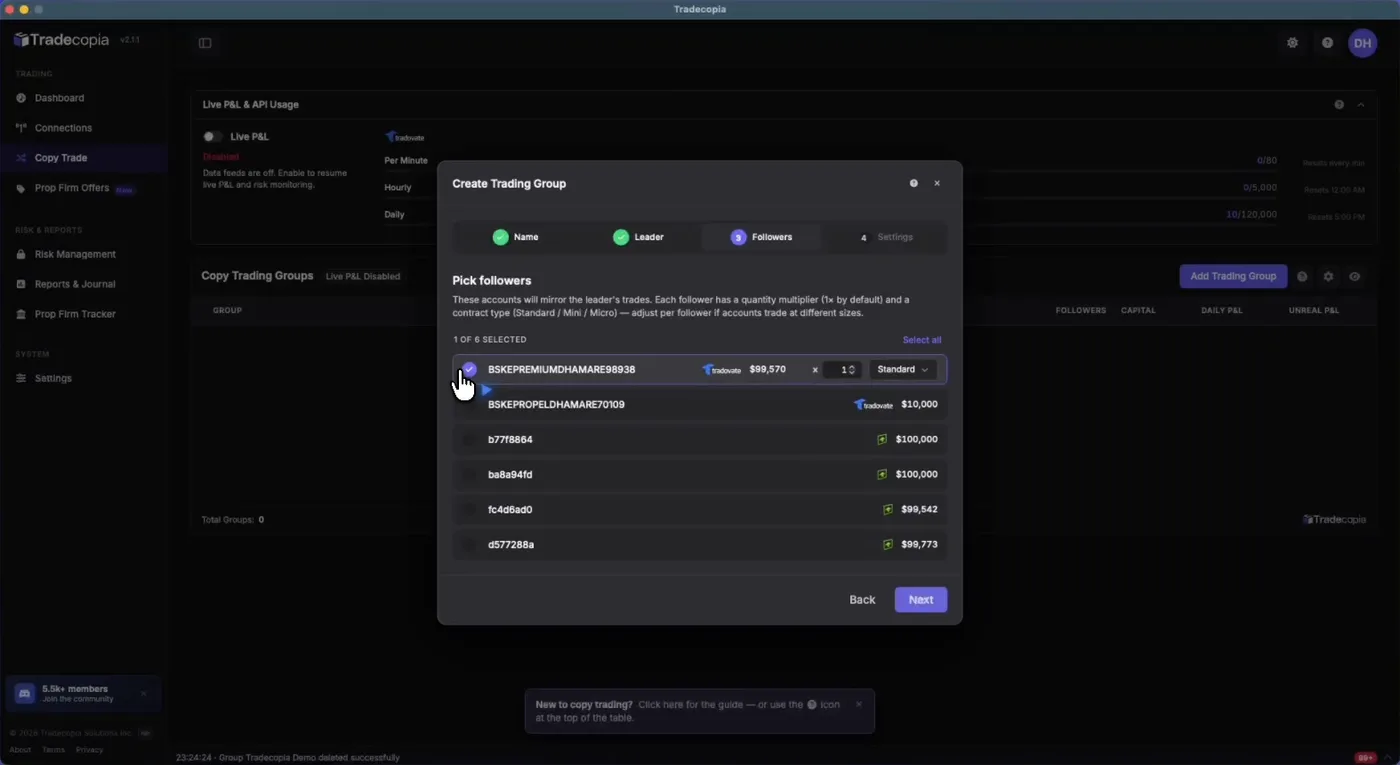
You create a group with one leader and as many followers as you like. For each follower you choose:
According to its help center, it sends orders to all followers at the same time, not one after another, and the internal copy takes milliseconds. What adds the most time is the round trip to the broker. That is why, they say, the cloud version is usually faster than the desktop one.
Which orders it copies. Market, limit, stop market and simple brackets: one entry with one take profit and one stop loss. Stop limit orders, automatic trailing stops and brackets with several targets or several stops are not supported. It does not block them, but warns they may work sometimes and fail other times. If you want to scale out, their suggested fix is to open several one-contract entries, each with its own bracket.
A side effect that catches some people out: if you trade a follower account by hand, the Reconciler closes your trade. To do it you have to pause that follower first.
Per account, you can set a daily loss limit, a daily profit target and a maximum number of trades per day. When a limit is hit, it closes positions and stops you opening new ones. But it does not work the same everywhere:
Each limit also has its own switch. Typing the number is not enough: if you do not enable it, it shows as "DISABLED" and does nothing. It is the first cause of "my limit did not trigger" in their help center.
In the cloud you also get Hard Lock: you lock the account for up to 48 hours and nobody, not even support, can lift it early. And an event scheduler that flattens everything or locks the accounts before a news release.
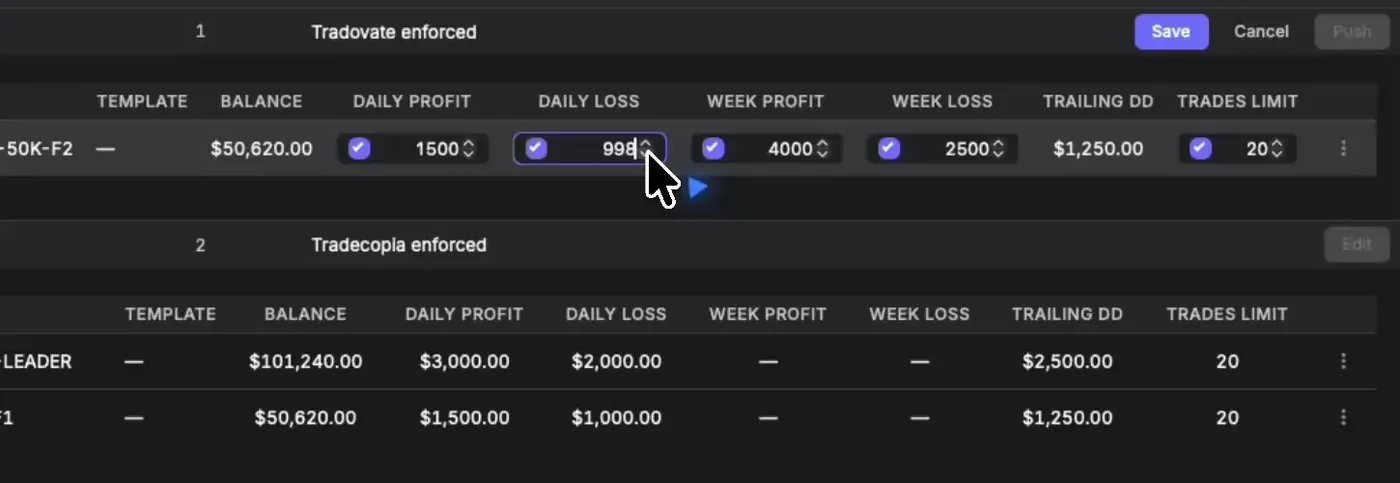
Tradovate allows about 80 requests per minute and 5,000 per hour, and every order, modification or cancellation counts once per account. Copying to many accounts and moving your stop a few times can use it up. Tradecopia cannot get around it, but it does show the counter on screen, which several users appreciate.
| Plan | Monthly | Billed yearly | Where it runs | Accounts |
|---|---|---|---|---|
| Pro | $49.99 | $34.99/mo | Your computer | Unlimited |
| Pro+ Lite | $79.99 | $59.99/mo | Their cloud, shared server | Unlimited |
| Pro+ | $149.99 | $119.99/mo | Their cloud, reserved capacity | Unlimited |
Worth reading twice:
Tradecopia connecting to your account does not mean you are allowed to use it. This is what the official rules say at the futures firms we track:
| Firm | Copy trading | What you need to know |
|---|---|---|
| Alpha Futures | Allowed | Only between your own accounts. They recommend the smallest account leads |
| AquaFunded Futures | Allowed on Flex accounts | All accounts must be yours |
| Blue Guardian Futures | Allowed, including external copiers | Opposite positions across accounts are forbidden |
| E8 Futures | Allowed | Hedging across accounts is forbidden, even if they are all yours |
| FTMO Futures | Allowed between your accounts | Each account must follow its own rules |
| FundedNext Futures | Allowed, including with other firms | They may ask you to prove every account is yours |
| The5ers Futures | Limited | Only 25K and 50K accounts, up to $75,000 in total |
| Top One Futures | Allowed | Up to 10 or 20 accounts, depending on the plan |
| Funded Futures Family | Not allowed, per our firm page | Explicitly forbids hedging across accounts |
| The Trading Pit Futures | Restricted | Its terms list copying trades among prohibited practices |
| Earn2Trade | Forbidden | They can refuse accounts and withdrawals if you used a copier |
Source: each firm's help center or official terms, checked on 8 October 2026. Rules change: check your firm's page before copying. And even if your firm allows it, whether you can connect depends on your account's provider, as explained above.
About the "whitelist". Tradecopia's help center says it is whitelisted with the firms it supports and that your sessions are not flagged. It does not publish which firms those are or any agreement, and its own help center admits it does not keep a list of compatible firms. It also makes clear this does not exempt you from your firm's rules.
The real risk is opposite positions. Several firms forbid having one account long and another short on the same contract, even for a few seconds and because of a glitch. On Reddit there are cases of traders whose profits Lucid removed for "self-hedging" while copying with Tradecopia. One of them showed their Tradovate logs and Tradecopia's reply, which found no mismatch, and the firm still did not review its decision. We do not know who was right. What we do know is that the firm decides, not the copier.
It scores 4.8 out of 5 on Trustpilot, from 363 reviews. The company invites reviews, and seven in ten 5 star reviews come from accounts with one or two reviews in total. Even so, many are long and specific. Our review analysis above breaks it down.
What comes up most, on Trustpilot and Reddit:
This routine comes from its own help center and from user experience:
Tradecopia is currently one of the best-regarded futures copiers, and it is easy to see why: unlimited accounts for a flat price, the option of sending orders from your own computer, mismatch protections on by default and very clear documentation about what it does and does not do.
Its limits are just as clear. It does not connect dxFeed, CQG or Alpha Trader. The desktop version needs your computer on and discipline when opening and closing. The Reconciler does not fix size. There are no refunds. And if something goes wrong, its liability stops at three months of fees. Only use it at firms that allow copying, and start with a few accounts.
Who it is for: futures traders with Tradovate, NinjaTrader or Rithmic accounts across several firms, who trade from a fixed computer or would rather pay for the cloud and forget about it.
Who it is not for: anyone with dxFeed or Alpha Futures accounts, anyone trading with trailing stops or partial exits in a single order, and anyone who needs to manage the group from a mobile app.
We read 217 of its 363 reviews (every 1 to 4 star review and the 191 most recent 5 star ones), on 8 October 2026.
Users like the daily loss and profit limits per account, flattening the whole group in one click and the journal. The most requested feature is a mobile app to flatten or pause the group away from home. One user reports that exiting with both TP and SL brackets opened a new trade.
★★★★★“It would be nice to have a mobile app that would allow me to simply flatten the group and or disable/enable it.”
★★★★★“When exiting trades that have TP and SL brackets, it will put you in a new trade while closing the one you were currently in.”
Most users say it copies fast and stays in sync, and many arrive after leaving Tradesyncer over its failures. Complaints exist but are few: 2 to 3 second delays for one user with many accounts, unnoticed disconnections, orders that were not cancelled and an outage in August 2026 that left stops uncopied. On the desktop plan, closing the app stops the copying.
★★★★★“When trading mnqs, my fills were usually only off by about $1-$3 when closing”
★★★★★“When reviewing the trade logs, follower accounts were consistently entering trades 2-3 seconds late on order open.”
★★★★★“I go back to log into their software website and I nearly lose all my evaluations accounts due to the incomplete replicate order of my stop loss order.”
Its strongest selling point: one flat price with unlimited accounts, against competitors that charge per account or per connection. Several describe it as half the price of Tradesyncer. The most specific complaint comes from someone who lost the discounted price of their code after changing cards.
★★★★★“Tradecopia wins for price. It offers unlimited account connections, where tradesyncer charges around $99 for just 4 accounts.”
★★★★★“went to go repurchase with a code and it says only available for first purchase, makes no sense when this is my first purchase they just took away my old billing, I signed up to be billed $28 not $40.”
The most repeated point after support: clean interface, setup in a few minutes and a short learning curve. The drawbacks are minor: journal prompts after flattening and manual trades on a follower being closed automatically if the account stays in the group.
★★★★★“the software is amazing and very intuitive to use and I had it up and running in no time at all.”
★★★★★“if an account is left in the copier and I try to trade it independently it immediately closes any trade I open”
Four in ten 5 star reviews mention support, almost always through Discord and with replies within minutes. In some cases the CEO joined the chat or money was refunded as a courtesy. The most serious criticism says that, faced with delays, support only asked for logs and to update the software.
★★★★★“whenever I’ve had a question, I’ve received a timely response along with a clear explanation rather than just a quick answer.”
★★★★★“The only advice given was to send in logs, follow the instructions and keep the software updated. That’s not support.”
It announced the August 2026 outage by email, both when it started and when it was fixed. On Trustpilot, however, its replies to complaints about speed insist the problem lies in the user's computer or connection, and it has not replied to reviews since March 2026. Its help center says it is whitelisted with the prop firms it supports, without naming them.
★★★★★“No matter how many accounts you want to copy, it is all under one same account, unlike other copy traders that charge you as you add accounts you want to copy.”
★★★★★“It works. And the discord is highly responsive if you need help.”
★★★★★“One of the main reasons I chose Tradecopia was that the copier runs directly on my machine rather than relying on a cloud-based setup.”
★★★★★“need a smart phone app or able to use on browser”
★★★★★“The whole time I thought I was trading multiple accounts, everything was disconnected.”
It replied to 9 of the 217 analysed reviews, all between November 2025 and March 2026. To complaints about speed it repeats that the software runs on the user's computer and that speed depends on their hardware and connection. To several one-line reviews it replied asking for details or calling them duplicates.
“Because of this design, performance depends entirely on each user’s local environment. To be transparent, we have thousands of users running the exact same software with millisecond-level replication and zero delays.”
“This account had previously posted a nearly identical fake review under the username auliaaaku, which Trustpilot reviewed and removed at the time for not being genuine.”
“We’re a local, single-tenant trade copier, so integrations are released carefully to ensure stability and prop-firm compliance rather than rushed timelines.”
Can you trust these reviews?
Trustpilot states the company invites reviews. Seven in ten 5 star reviews come from accounts with one or two reviews in total, and its affiliate program is very active: Reddit is full of posts with discount codes. Even so, many positive reviews are long and specific. Between 10 and 15 December 2025, six near-identical 1 star reviews came from new accounts; the company says they are fake and that Trustpilot already removed an earlier one. There is no Trustpilot alert today.
Nobody has reviewed Tradecopia yet. Do you use it?
Share it and earn Respect.
Trade copiers
Cloud futures copier with journal and risk controls
Cloud · 6 platforms
from $49 /mo
7-day free trial (card required)Trade copiers
Cloud copier that mixes platforms, from MT4 to NinjaTrader
Cloud · 10 platforms
from €9 /account per month
€30 free credit, no card
Trade copiers
Cloud copier for CFDs and futures, with optional dedicated IP
Cloud · 10 platforms
from $10 /account per month
10-day free trial on the futures copier onlyTrade copiers
Cloud copier for MetaTrader 4 and 5 only
Cloud · 2 platforms
from $20 /mo
Data checked on their official site on 8 October 2026: Precios · Funciones · Preguntas frecuentes
FreeNo spamOne-click unsubscribe
Join us on our mission to become the most influential family in funded trading.
Giveaway · Ends in …
2 × $25K accounts2 × $25K Instant Pro+ Max accounts